Backup Compression in SQL Server 2008

Backup Compression in SQL Server 2008

Backup Compression in SQL Server 2008  is really a amazing feature. Earlier we used to use litespeed to compress the backup. As we are dealing with the backups that are in 2 GB to 1 TB in size , to move the bkps to remote machines the bkp should be compressed. 

Hence this feature is really saving the Size and Time also. I wondered to see it is also reducing the time also.

I just tested this feature for a small database ,”Optim_Test1″ on my local machine.

Performed the backup with No Compression

Backup Compression in SQL Server 2008


Backup Compression in SQL Server 2008:


Backup Compression in SQL Server 2008

From the above screens you might have observed that the option WITH COMPRESSION has been showing differences in both Time and Size.

Posted in SQL Server DBA | Tagged , , , , | Leave a comment

Database Restore Progress in SQL Server

Database Restore Progress in SQL Server

This post will takes you through you monitoring Database Restore Progress in SQL Server. Here we have an useful script which can help us in the process of restoration of databases. As we are restoring the databases on daily basis of size ranging from 1 GB to 1TB files ,we would like to know the exact percentage completed , and estimated time to complete. The below script retrieves those details which can help us in further proceedings.

T-SQL Script to Monitor Database Restore Progress in SQL Server: 

USE MASTER
GO
SELECT
     Command,
     s.Text AS Query,
     start_time AS StartTime,
     percent_complete AS Percentage_Completed,
     CAST(((DATEDIFF(s,start_time,GetDate()))/3600)asvarchar)+' hour(s), '
          +CAST((DATEDIFF(s,start_time,GetDate())%3600)/60 asvarchar)+'min, '
          +CAST((DATEDIFF(s,start_time,GetDate())%60)asvarchar)+' sec'as Running_Time,
     CAST((estimated_completion_time/3600000)asvarchar)+' hour(s), '
          +CAST((estimated_completion_time %3600000)/60000 asvarchar)+'min, '
          +CAST((estimated_completion_time %60000)/1000 asvarchar)+' sec'as Est_Time_To_Go,
      DATEADD(second,estimated_completion_time/1000,getdate())as Est_Completion_Time
FROM  SYS.DM_EXEC_REQUESTS R
      CROSS APPLY sys.dm_exec_sql_text(r.sql_handle) s
WHERE
      R.Command in ('RESTORE DATABASE', 'BACKUP DATABASE', 'RESTORE LOG', 'BACKUP LOG')

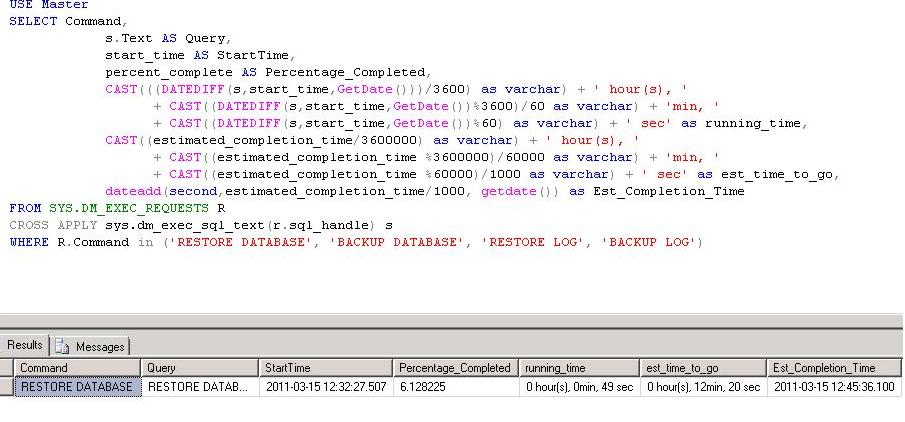
We have initiated a restore and ran this query it shows the status as below

After a few minutes


Posted in Uncategorized | Tagged , , , , , , , , , | 1 Comment

Dynamic coloring for char series in SSRS

Dynamic coloring for char series in SSRS

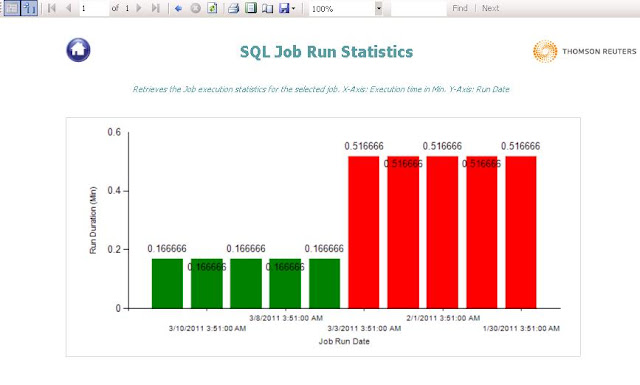
This post helps in Dynamic coloring for char series in SSRS. We had a requirement to collect SQL Server job execution timings and showcase in a SSRS report using a bar chart. For the longest running times the bar should be colored with RED and the remaining all can be in green color.

Once you placed the Chart into your report. Go to the Chart and right click on any Bar

–> Select Series Properties –> Go to Fill Tab –> Click on Expression –> Place the below code

=IIf(Fields!RunDuration.Value>= Max(Fields!RunDuration.Value, “DataSet1”) And Min(Fields!RunDuration.Value, “DataSet1”)<> Max(Fields!RunDuration.Value, “DataSet1”) And Min(Fields!RunDuration.Value, “DataSet1”)>0, “Red”,”Green”)

**** Here RunDuration is the column name on which the series is being changed.

**** If the RunDuration of a job is same then all the bars in the series are shown as Green

Dynamic coloring for char series in SSRS

**** The highest execution bar is colored as Red…..

Dynamic coloring for char series in SSRS


Posted in MSBI, SSRS | Tagged , , | Leave a comment