List of Replicated Tables

List Of Replicated Tables


This post helps you in getting the List of Replicated Tables. Recently some one from Dev team raised a request that he found mismatch for a Table on all replicated servers. At the routing server the table contains 6 rows and at some of the partition (Subscribers) the table contains 3 rows and remaining are at the proper sync levels. Now we need to check whether the table is subscribed to those where data is missing.

 To check that we could finally came with a Query which can save a lot of time. Lets assume the table name is “Test_Table” the connect to the publisher database and run the below query it’ll give us the total subscribers details to which the Table is subscribed

SELECT
pub.name AS [Publication],
art.name as [Article],
ser.name as [Subsriber],
sub.dest_db as [DestinationDB]
FROM
dbo.syssubscriptions sub
INNERJOINsys.servers ser ON ser.server_id = sub.srvid
INNERJOIN dbo.sysarticles art ON art.artid = sub.artid
INNERJOIN dbo.syspublications pub ON pub.pubid = art.pubid
WHERE art.Name='Test_Table'

The above query get you the list of replicated tables.

Posted in Uncategorized | Tagged , , , | Leave a comment

How to use CASE in Where Condition

How to use CASE in Where Condition

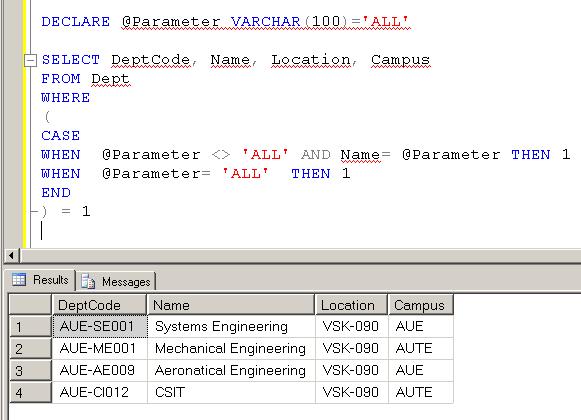
We had a situation in which we had to use case in where condition. This post helps in understanding “How to use CASE in Where Condition”. Lets consider a situation where we need to write a query which should satisfy the below conditions

1. We will pass a parameter: Department Name
2. If we pass the department name, it should return that dept details
3. If we pass “ALL” as perm value it should return all department details
4. Of course a lot ways to implement this but here intension is how we can use CASE in Where statement

T-SQL Script: How to use CASE in Where Condition


DECLARE @Parameter VARCHAR(100)=’Systems Engineering’

SELECT DeptCode, Name, Location, Campus
FROM Dept
WHERE
(
CASE WHEN  @Parameter <> ‘ALL’ AND Name= @Parameter THEN 1
WHEN  @Parameter= ‘ALL’  THEN 1
END
) = 1

How to use CASE in Where Condition


DECLARE @Parameter VARCHAR(100)=’ALL’

SELECT DeptCode, Name, Location, Campus
FROM Dept
WHERE
(
CASE
WHEN  @Parameter <> ‘ALL’ AND Name= @Parameter THEN 1
WHEN  @Parameter= ‘ALL’  THEN 1
END
) = 1

How to use CASE in Where Condition
Posted in SQL Development, SQL Scripts | Tagged , , , | Leave a comment

Visual Studio 2010 SP1 And IE 9.0 Released Today

Visual Studio 2010 SP1 And IE 9.0 Released Today

This post is to give links to the Visual Studio 2010 SP1 And IE 9.0 Released Today

Visual Studio 2010 Service Pack 1 Now Available

http://www.microsoft.com/downloads/en/details.aspx?FamilyID=75568aa6-8107-475d-948a-ef22627e57a5&displaylang=en

Download the release version of IE9,

http://www.beautyoftheweb.com/#/download


Posted in Uncategorized | Tagged | Leave a comment