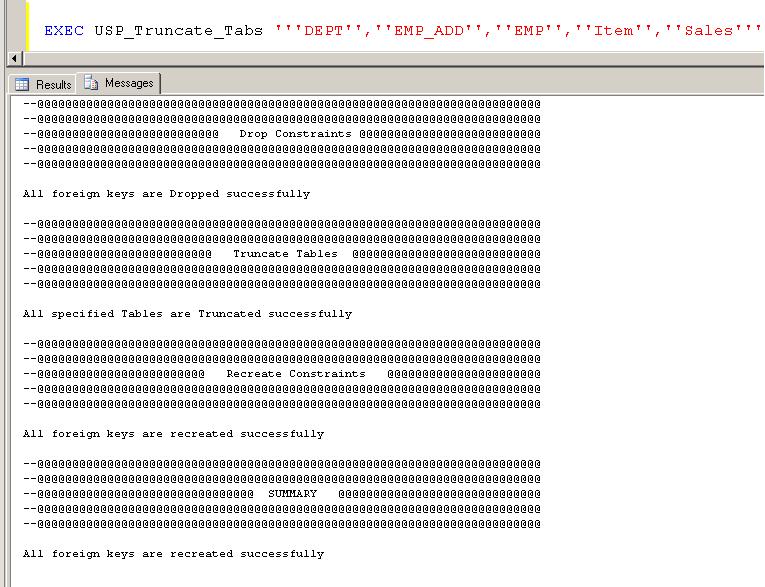
Truncate Table with Foreign Key constraint
This post helps you in automating the process of Truncate Table with Foreign Key constraint”. We recently working for a client on data migration project. There was a requirement for truncating tables. But we had to face issues as all those tables are having foreign keys. So the requirement is :
- Everytime we’ll send you a list of tables to be truncated
- First collect all constraint details from those tables
- Drop all foreign keys
- Truncate tables
- Recreate all constraints
- If in-case of any failure the script should not fail or through any error message instead it should continue with the next object and failed objects / constraints should be printed
We built the below stored procedure to fulfill the client requirement and it worked perfectly as expected.
Stored Procedure Creation to Truncate Table with Foreign Key constraint:
IF EXISTS(SELECT 1 FROM SYS.SYSOBJECTS WHERE NAME='USP_Truncate_Tabs' AND TYPE='P')
BEGIN
	DROP PROC USP_Truncate_Tabs;
END

GO

CREATE PROC USP_Truncate_Tabs(@String VARCHAR(7500))
AS
BEGIN
SET NOCOUNT ON

/*** Verify table existence if not avilable it creates anew table on master database ***/
IF NOT EXISTS(SELECT 1 FROM master.sys.sysobjects WHERE Name='Constraints' AND TYPE='U')
BEGIN
	CREATE TABLE [master].[dbo].[Constraints]
			(ID INT IDENTITY,
			DropStmt VARCHAR(1000),
			Createstmt VARCHAR(1000),
			DropStatus BIT DEFAULT(1),
			CreateStatus BIT DEFAULT(1),
			TruncateStatus BIT DEFAULT(1),
			LastUsed DATETIME DEFAULT(GETDATE()));
END

TRUNCATE TABLE [master].[dbo].[Constraints]

/*** Get the list of Tables from the input String ***/
DECLARE @Tab TABLE(ID INT IDENTITY,TabName VARCHAR(200))
DECLARE @SQL1 VARCHAR(8000)
SET @SQL1='SELECT NAME FROM sysobjects  WHERE TYPE=''U'' AND name in('+(@String)+')'
INSERT INTO @Tab EXEC(@SQL1)


/*** Insert All Drop and Create dtatements into the table Constraints ***/
INSERT INTO [master].[dbo].[Constraints] (DropStmt,CreateStmt)
SELECT
  'ALTER TABLE [' + ForeignKeys.ForeignTableSchema +
      '].[' + ForeignKeys.ForeignTableName +
      '] DROP CONSTRAINT [' + ForeignKeys.ForeignKeyName + ']; '
,'ALTER TABLE ['+ ForeignKeys.ForeignTableSchema +
      '].[' + ForeignKeys.ForeignTableName +
      '] WITH CHECK ADD CONSTRAINT [' +  ForeignKeys.ForeignKeyName +
      '] FOREIGN KEY([' + ForeignKeys.ForeignTableColumn +
      ']) REFERENCES [' + schema_name(sys.objects.schema_id) + '].[' +
  sys.objects.[name] + ']([' +
  sys.columns.[name] + ']);  '
 from sys.objects
  inner join sys.columns
    on (sys.columns.[object_id] = sys.objects.[object_id])
  inner join (
    select sys.foreign_keys.[name] as ForeignKeyName
     ,schema_name(sys.objects.schema_id) as ForeignTableSchema
     ,sys.objects.[name] as ForeignTableName
     ,sys.columns.[name]  as ForeignTableColumn
     ,sys.foreign_keys.referenced_object_id as referenced_object_id
     ,sys.foreign_key_columns.referenced_column_id as referenced_column_id
     from sys.foreign_keys
      inner join sys.foreign_key_columns
        on (sys.foreign_key_columns.constraint_object_id
          = sys.foreign_keys.[object_id])
      inner join sys.objects
        on (sys.objects.[object_id]
          = sys.foreign_keys.parent_object_id)
        inner join sys.columns
          on (sys.columns.[object_id]
            = sys.objects.[object_id])
           and (sys.columns.column_id
            = sys.foreign_key_columns.parent_column_id)
    ) ForeignKeys
    on (ForeignKeys.referenced_object_id = sys.objects.[object_id])
     and (ForeignKeys.referenced_column_id = sys.columns.column_id)
 where (sys.objects.[type] = 'U')
  and (sys.objects.[name] not in ('sysdiagrams'))


/*** Drop all Constraints in the database and update the Constraints table for failed statements ***/
/*** From Constraints Table Status 1 - Success and Status 0 - Failed ***/
PRINT'@@@@@@@@@@@@@@@@@@@@@@@@@@@@@@@@@@@@@@@@@@@@@@@@@@@@@@@@'
PRINT'@@@@@@@@@@@@@@@@@@@@@@@@@@@@@@@@@@@@@@@@@@@@@@@@@@@@@@@@'
PRINT'@@@@@@@@@@@@@@@@   Drop Constraints @@@@@@@@@@@@@@@@@@@@'
PRINT'@@@@@@@@@@@@@@@@@@@@@@@@@@@@@@@@@@@@@@@@@@@@@@@@@@@@@@@@'
PRINT'@@@@@@@@@@@@@@@@@@@@@@@@@@@@@@@@@@@@@@@@@@@@@@@@@@@@@@@@'

DECLARE @Sql VARCHAR(1000)
DECLARE @i INT,@Max INT
SELECT @Max=COUNT(1)FROM [master].[dbo].[Constraints]
SET @i=1

WHILE(@i<=@Max)
BEGIN
	SELECT @Sql=DropStmt FROM [master].[dbo].[Constraints] WHERE ID=@i
	BEGIN TRY
		EXEC(@Sql)
	END TRY
	BEGIN CATCH
		UPDATE [master].[dbo].[Constraints] SET DropStatus=0 WHERE ID=@i
	END CATCH
	SET @Sql=''
	SET @i=@i+1
END

/*** Check for the errors in droping the constraints ***/

IF NOT EXISTS(SELECT 1 FROM [master].[dbo].[Constraints] WHERE DropStatus=0)
BEGIN
	PRINT'All foreign keys are Dropped successfully'
END
ELSE
BEGIN
	PRINT'A result set retrived with the Failed Statements'
	SELECT CreateStmt AS'FailedtoDrop'FROM [master].[dbo].[Constraints] WHERE DropStatus=0
END


/*** Truncate the tables specified in the input string ******/
/*** It directly echos the failed statements on results window ***/
PRINT' '
PRINT'@@@@@@@@@@@@@@@@@@@@@@@@@@@@@@@@@@@@@@@@@@@@@@@@@@@@@@@@'
PRINT'@@@@@@@@@@@@@@@@@@@@@@@@@@@@@@@@@@@@@@@@@@@@@@@@@@@@@@@@'
PRINT'@@@@@@@@@@@@@@@@ TRUNCATE Tables @@@@@@@@@@@@@@@@@@@@@@@'
PRINT'@@@@@@@@@@@@@@@@@@@@@@@@@@@@@@@@@@@@@@@@@@@@@@@@@@@@@@@@'
PRINT'@@@@@@@@@@@@@@@@@@@@@@@@@@@@@@@@@@@@@@@@@@@@@@@@@@@@@@@@'
PRINT' '

DECLARE @TabName VARCHAR(200)
SELECT @Max=COUNT(1)FROM @Tab
SET @i=1
WHILE(@i<=@Max)
BEGIN
	SELECT @TabName=TabName FROM @Tab WHERE ID=@i
	SELECT @Sql='TRUNCATE TABLE '+@TabName
	BEGIN TRY
		EXEC(@sql)
	END TRY
	BEGIN CATCH
		UPDATE [master].[dbo].[Constraints] SET TruncateStatus=0 WHERE ID=@i
	END CATCH
	SET @Sql=''
	SET @i=@i+1
END

/*** Check for the errors in Truncating the Tables ***/

IF NOT EXISTS(SELECT 1 FROM [master].[dbo].[Constraints] WHERE TruncateStatus=0)
BEGIN
	PRINT'All specified Tables are Truncated successfully'
END
ELSE
BEGIN
	PRINT'A result set retrived with the Failed Statements'
	SELECT CreateStmt AS'FailedtoTruncate'FROM [master].[dbo].[Constraints] WHERE TruncateStatus=0
END

/*** Recreate all Constraints in the database and update the Constraints table for failed statements ***/
/*** From Constraints Table Status 1 - Success and Status 0 - Failed ***/

PRINT' '
PRINT'@@@@@@@@@@@@@@@@@@@@@@@@@@@@@@@@@@@@@@@@@@@@@@@@@@@@@@@@'
PRINT'@@@@@@@@@@@@@@@@@@@@@@@@@@@@@@@@@@@@@@@@@@@@@@@@@@@@@@@@'
PRINT '@@@@@@@@@@@@@@   Recreate Constraints   @@@@@@@@@@@@@@@@'
PRINT'@@@@@@@@@@@@@@@@@@@@@@@@@@@@@@@@@@@@@@@@@@@@@@@@@@@@@@@@'
PRINT'@@@@@@@@@@@@@@@@@@@@@@@@@@@@@@@@@@@@@@@@@@@@@@@@@@@@@@@@'
PRINT' '

SELECT @Max=COUNT(1)FROM [master].[dbo].[Constraints]
SET @i=1
WHILE(@i<=@Max)
	BEGIN
		SELECT @Sql=CreateStmt FROM [master].[dbo].[Constraints] WHERE ID=@i
	BEGIN TRY
		EXEC(@Sql)
	END TRY
	BEGIN CATCH
		UPDATE [master].[dbo].[Constraints] SET CreateStatus=0 WHERE ID=@i
	END CATCH
	SET @Sql=''
	SET @i=@i+1
END

/*** Check for the errors in recreating the constraints ***/
IF NOT EXISTS(SELECT 1 FROM [master].[dbo].[Constraints] WHERE CreateStatus=0)
	PRINT'All foreign keys are recreated successfully'
ELSE
	PRINT'Foreign keys are recreated with errors look into Summary'

/***** Summary   ******/
PRINT' '
PRINT'@@@@@@@@@@@@@@@@@@@@@@@@@@@@@@@@@@@@@@@@@@@@@@@@@@@@@@@@'
PRINT'@@@@@@@@@@@@@@@@@@@@@@@@@@@@@@@@@@@@@@@@@@@@@@@@@@@@@@@@'
PRINT'@@@@@@@@@@@@@@@@@@@@@@@  SUMMARY  @@@@@@@@@@@@@@@@@@@@@@'
PRINT'@@@@@@@@@@@@@@@@@@@@@@@@@@@@@@@@@@@@@@@@@@@@@@@@@@@@@@@@'
PRINT'@@@@@@@@@@@@@@@@@@@@@@@@@@@@@@@@@@@@@@@@@@@@@@@@@@@@@@@@'
PRINT' '

IF NOT EXISTS(SELECT 1 FROM [master].[dbo].[Constraints] WHERE CreateStatus=0)
BEGIN
	PRINT'All foreign keys are recreated successfully'
END
ELSE
BEGIN
	PRINT'A result set retrived with the Failed Statements'
	SELECT CreateStmt AS'FailedtoRecreate'FROM [master].[dbo].[Constraints] WHERE CreateStatus=0
END

/**** Second Attempt to Recreating the failed constraints if any ****/

IF EXISTS(SELECT 1 FROM [master].[dbo].[Constraints] WHERE CreateStatus=0)
BEGIN
	PRINT' '
	PRINT'@@@@@@@@@@@@@@@@@@@@@@@@@@@@@@@@@@@@@@@@@@@@@@@@@@@@@@@@'
	PRINT'@@@@@@@@@@@@@@@@@@@@@@@@@@@@@@@@@@@@@@@@@@@@@@@@@@@@@@@@'
	PRINT'@@@@@@ Final Atempt to Recreate Constraints   @@@@@@@@@@'
	PRINT'@@@@@@@@@@@@@@@@@@@@@@@@@@@@@@@@@@@@@@@@@@@@@@@@@@@@@@@@'
	PRINT'@@@@@@@@@@@@@@@@@@@@@@@@@@@@@@@@@@@@@@@@@@@@@@@@@@@@@@@@'
	PRINT' '

	DECLARE @Recreate Table(ID INT IDENTITY,ConID INT,CreateStmt VARCHAR(1000))
	INSERT INTO @Recreate (ConID,CreateStmt)SELECT ID,CreateStmt FROM [master].[dbo].[Constraints] WHERE CreateStatus=0
	SELECT @Max=COUNT(1)FROM @Recreate
	SET @i=1
	SET @sql=''
	WHILE(@i<=@Max)
		BEGIN
		SELECT @Sql=CreateStmt FROM @Recreate WHERE ID=@i
		BEGIN TRY
			EXEC(@Sql)
			UPDATE [master].[dbo].[Constraints] SET CreateStatus=1 WHERE ID IN(
			SELECT ConID FROM @Recreate WHERE ID=@i)
		END	TRY
		BEGIN	CATCH
			PRINT'Final Attmept also Failed to Execute '+@sql
		END CATCH
		SET @Sql=''
		SET @i=@i+1
		END
	PRINT' '
	IF NOT EXISTS(SELECT 1 FROM [master].[dbo].[Constraints] WHERE CreateStatus=0)
	PRINT'All foreign keys are recreated successfully in Final Attempt'
	ELSE
	PRINT'Final Attempt is also filed in recreating all foreign keys there might be problem with domain intigrity'
	PRINT' '

END

END