How to control windows services from SQL Server?

How to control windows services from SQL Server?

For a SQL Server DBA there are scenarios where he/she needs to deal with Windows services from SQL Server when there is no direct access to Windows server and only have access to SQL Server.
Monitor SQL Server services using T-SQL
 
XP_SERVICECONTROL:
It helps DBA to know the status and control the windows services from SQL Server.

Syntax:  XP_SERVICECONTROL ,

Action:  There are total 5 actions can be performed on services.


  • Start: To start a service
  • Stop: To stop a service
  • Pause: To pause a service
  • Continue: To start a passed service
  • Querystats: To know the current status of a service

Service Name: Can be any windows service
Example:

— To know the status of SQL Server Agent
EXECMASTER..XP_SERVICECONTROL’QueryState’,’SQLSERVERAGENT’
GO
— Start a service – Postgresql 9.2 database service
EXECMASTER..XP_SERVICECONTROL’Start’,’postgresql-x64-9.2′
GO
— To know the status Distributed Transaction Coordinator
EXECMASTER..XP_SERVICECONTROL’QueryState’,’MSDTC’


— Stop SQL EXPRESS service
EXECMASTER..XP_SERVICECONTROL’Stop’,’MSSQL$SQLEXPRESS’
GO
WAITFORDELAY’00:00:05′—- 5 Second Delay
GO
— Get status SQL EXPRESS service
EXECMASTER..XP_SERVICECONTROL’QueryState’,’MSSQL$SQLEXPRESS’
GO
WAITFORDELAY’00:00:05′—- 5 Second Delay
GO
— Start SQL EXPRESS service
EXECMASTER..XP_SERVICECONTROL’Start’,’MSSQL$SQLEXPRESS’
GO

Note: It really helps a DBA in monitoring windows services and the process can be automated.


Posted in SQL Server DBA | Tagged , , , , , , , , | Leave a comment

Incremental Load in ssis with example

Incremental Load in SSIS with example

This post demonstrates the incremental load in SSIS with example. Based on the business requirement and data volume we should determine the ETL process. We’ll assume we have a low to mid-sized source data file and here are the requirements:

Tech Tip : Carry out complex database operations and monitor them remotely by migrating your Sql server into the cloud and access it remotely on your preferred device(PC/Mac/android/iOS) with cloud hosted virtual desktop from:

Apps4Rent

CloudDesktopOnline with dedicated migration support from www.Apps4Rent.com

ETL Requirement:

We have a distributed database system and getting customer information on daily basis to load into SQL Server instance by following the below conditions:

  • Customer information is sending in flat file format
  • We are getting Delta Data Feed that means it includes new, updated and deleted customer’s data.
  • Compare Source (Flat File) and Destination (SQL Server) customer ID
  • If no match found at destination: Insert Row into Destination
  • If match found and IsDeleted = 1 / True: Delete the row from Destination
  • If match found: Update row from source to destination

Note:

  • We are using Sales.Customer from [AdventureWorks].
  • Be cautious in using OLEDB Command for large datasets as it’s a row by row process and impact the performance.
  • In case of doing incremental load for large datasets, load data into staging table and then update / delete using a query through Execute SQL Task.

 ETL Solution Design:

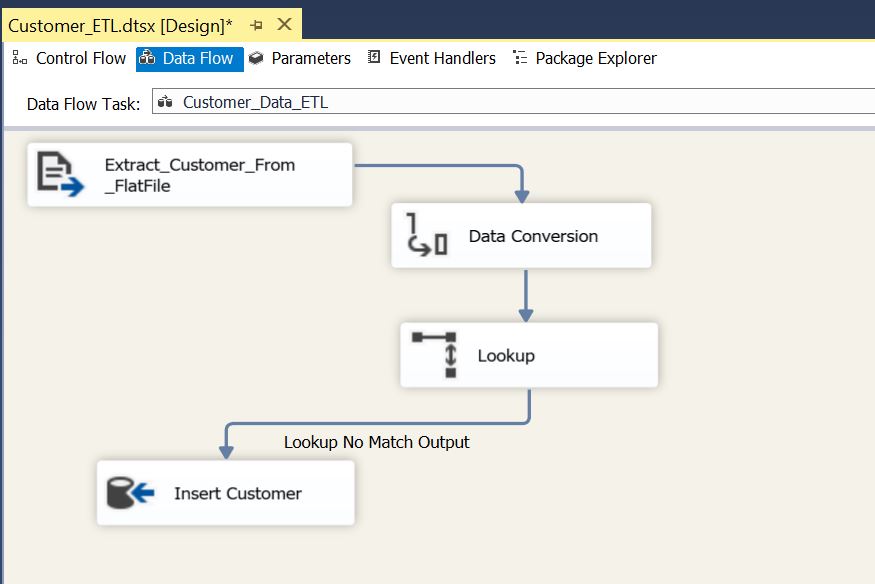
Flat File Source: To extract data from source flat file

Data Conversation: Convert source columns datatype to match the destination customer table

Lookup: Compare source and destination customerID column

  • No-Match Output: When there is no match found in destination
  • Match Output: When match found between source and destination

Conditional Split: Check if IsDeleted = 1 then redirect it to DELETE output. Redirect default output to UPDATE output.

OLEDB Destination: For inserting new records

OLEDB Command (Update): For updating rows

OLEDB Command (Delete): For deleting rows

ETL Package Design:

Open SQL Server Data Tools

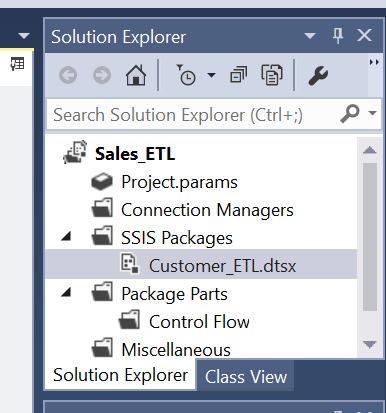
Create a new Project name it as “Sales_ETL” and Package name it as “Customer_ETL”
Incremental Load in SSIS with example

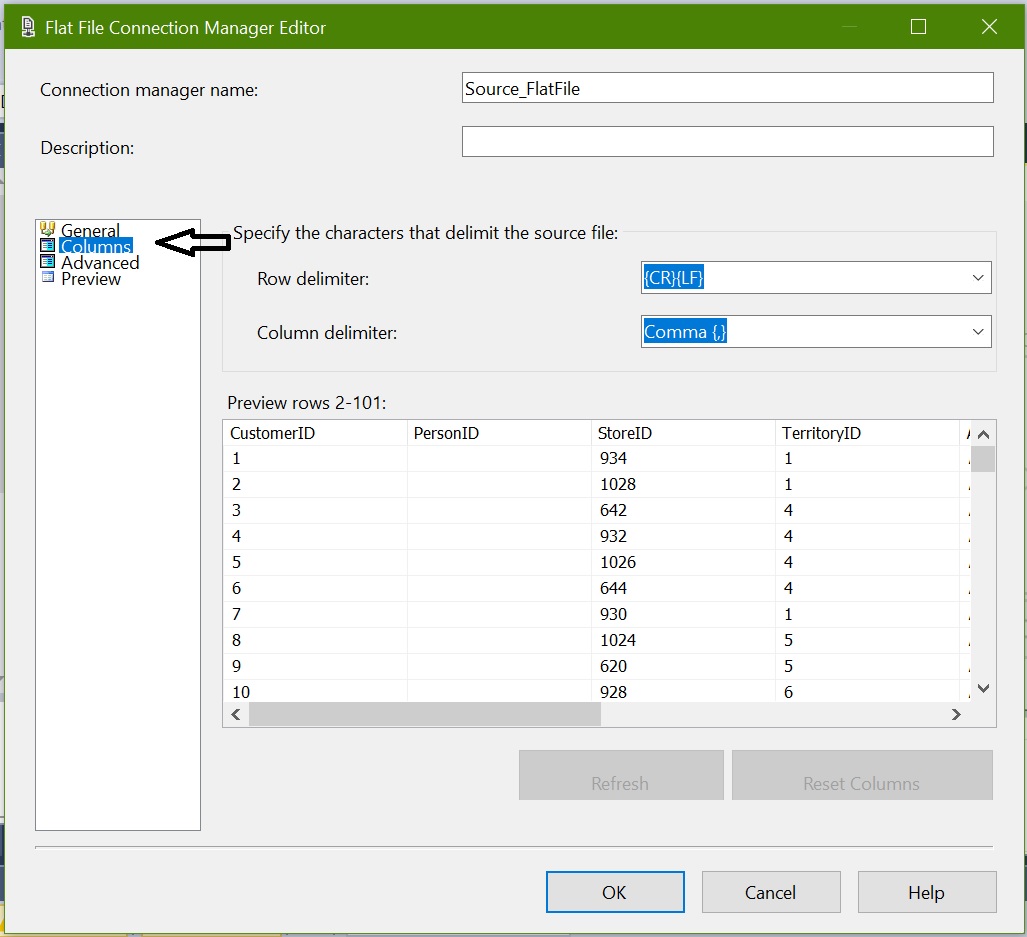
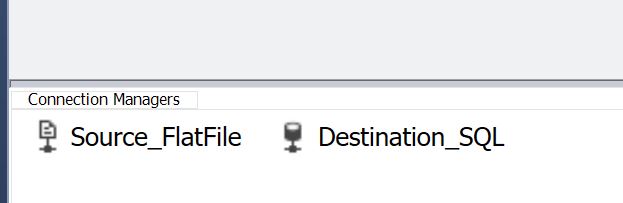
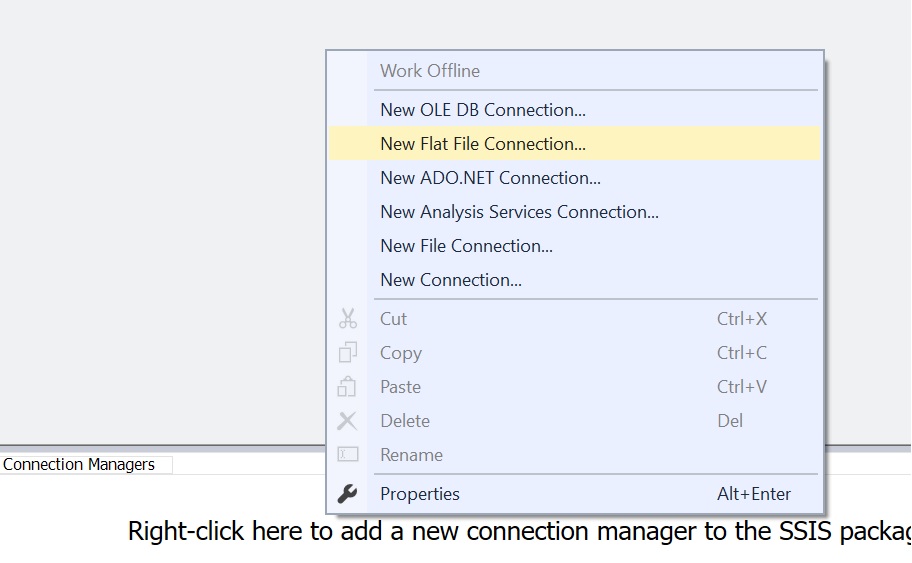
Create two connection managers 1) Source – New Flat File Connection 2) New OLE DB Connection
Incremental Load in SSIS with example Incremental Load in SSIS with example Incremental Load in SSIS with example Incremental Load in SSIS with example Incremental Load in SSIS with example

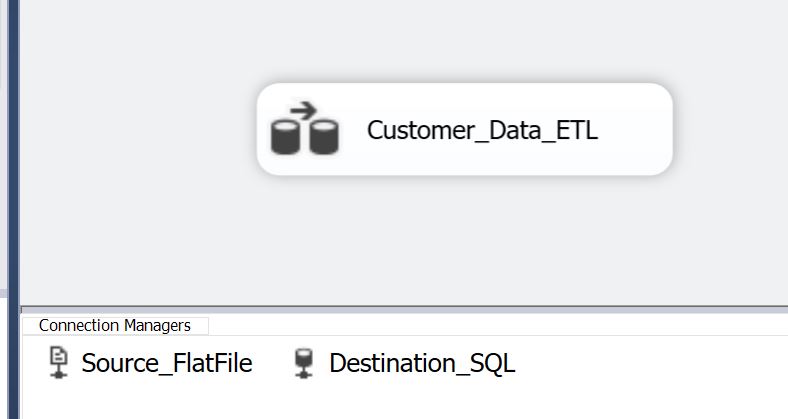
Add a Data Flow Task to Control Flow and name it as “Customer_Data_ETL”
Incremental Load in SSIS with example

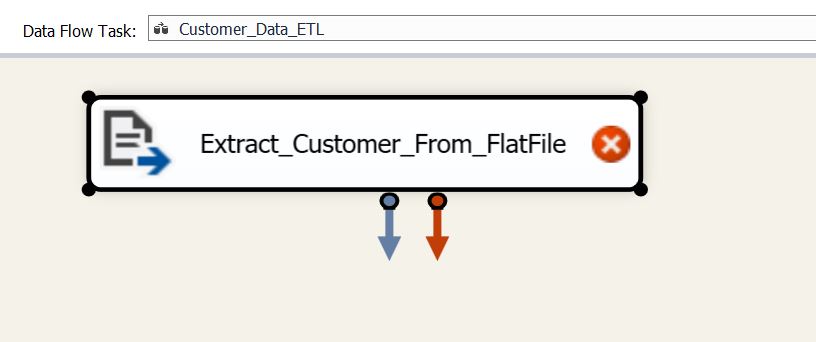
In Data Flow Task, add Flat File Source and name it as “Extract_Customer_From_FlatFile” and connect to the flat file source:
Incremental Load in SSIS with example Incremental Load in SSIS with example Incremental Load in SSIS with example

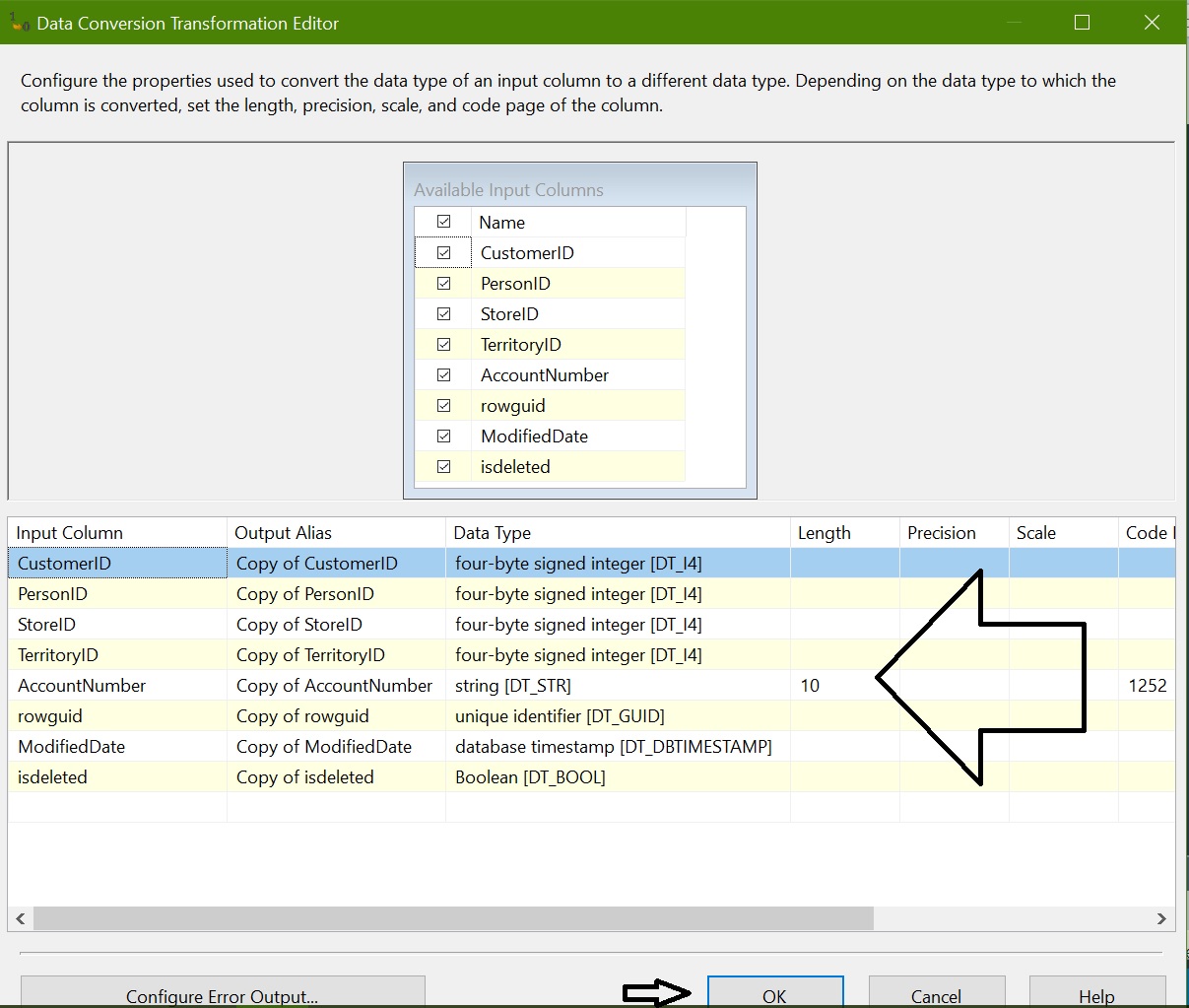
Add “Data Conversion” and convert datatype for all columns as per the destination table:
Incremental Load in SSIS with example

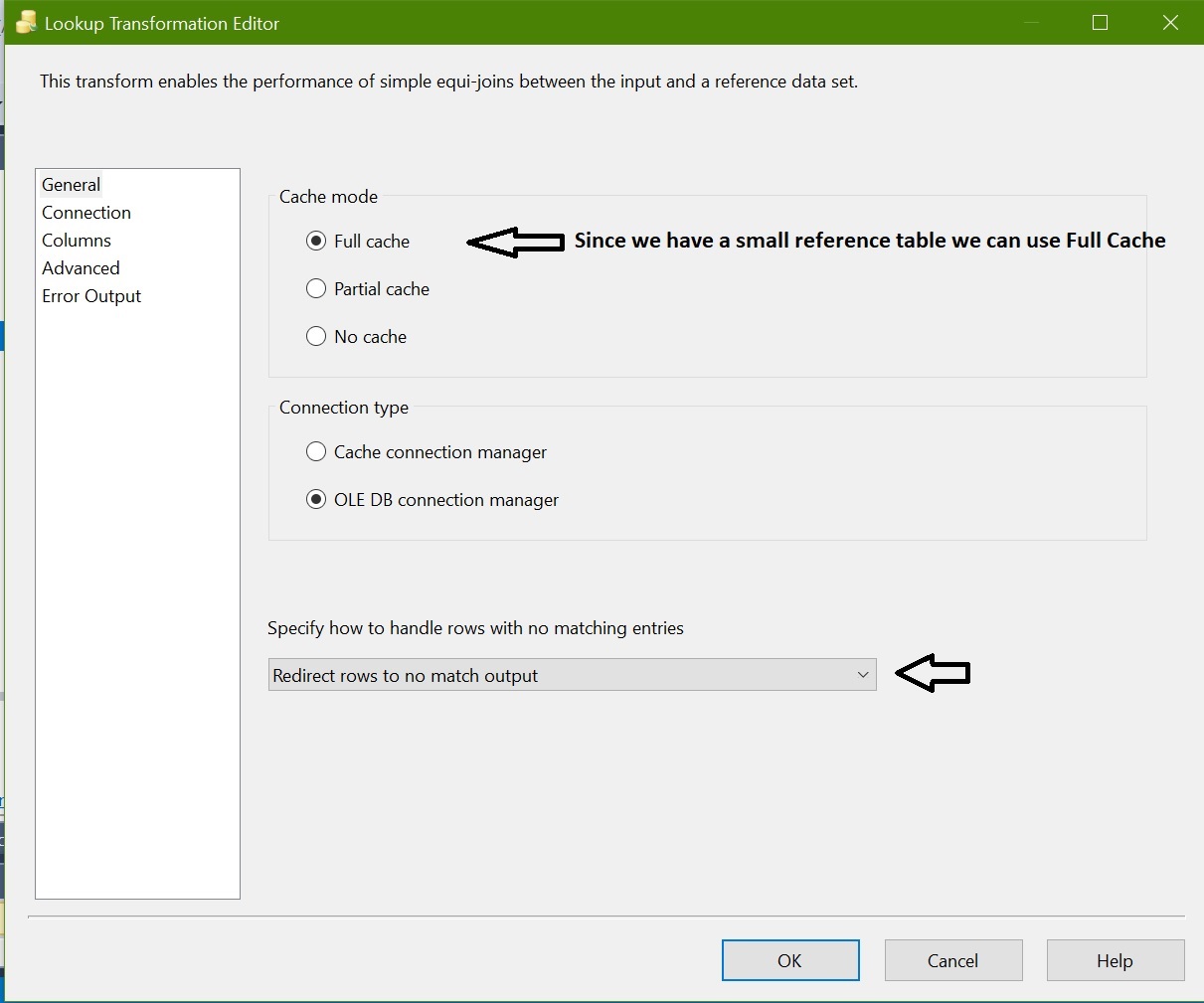
Add lookup transformation and configure as below

Full Cache: Sine we have a small reference data set we can choose Full Cache option. It means it capture the entire reference set into Memory instead of connecting database every time when required.

Redirect: Rows to No Match when no match found at destination.
Incremental Load in SSIS with example

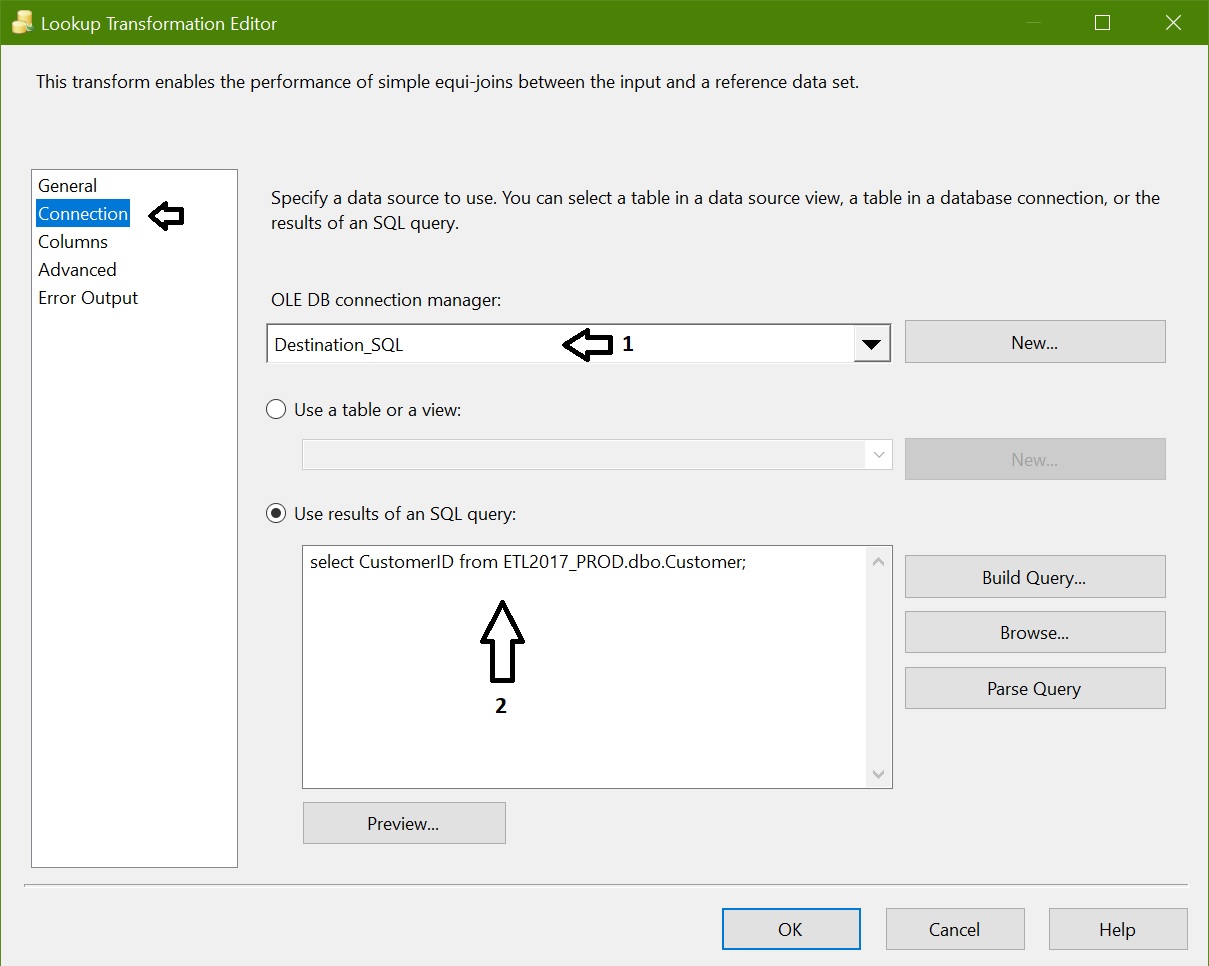
Connections: Instead of getting entire table we are using a SQL Query as we required only CustomerID.
Incremental Load in SSIS with example

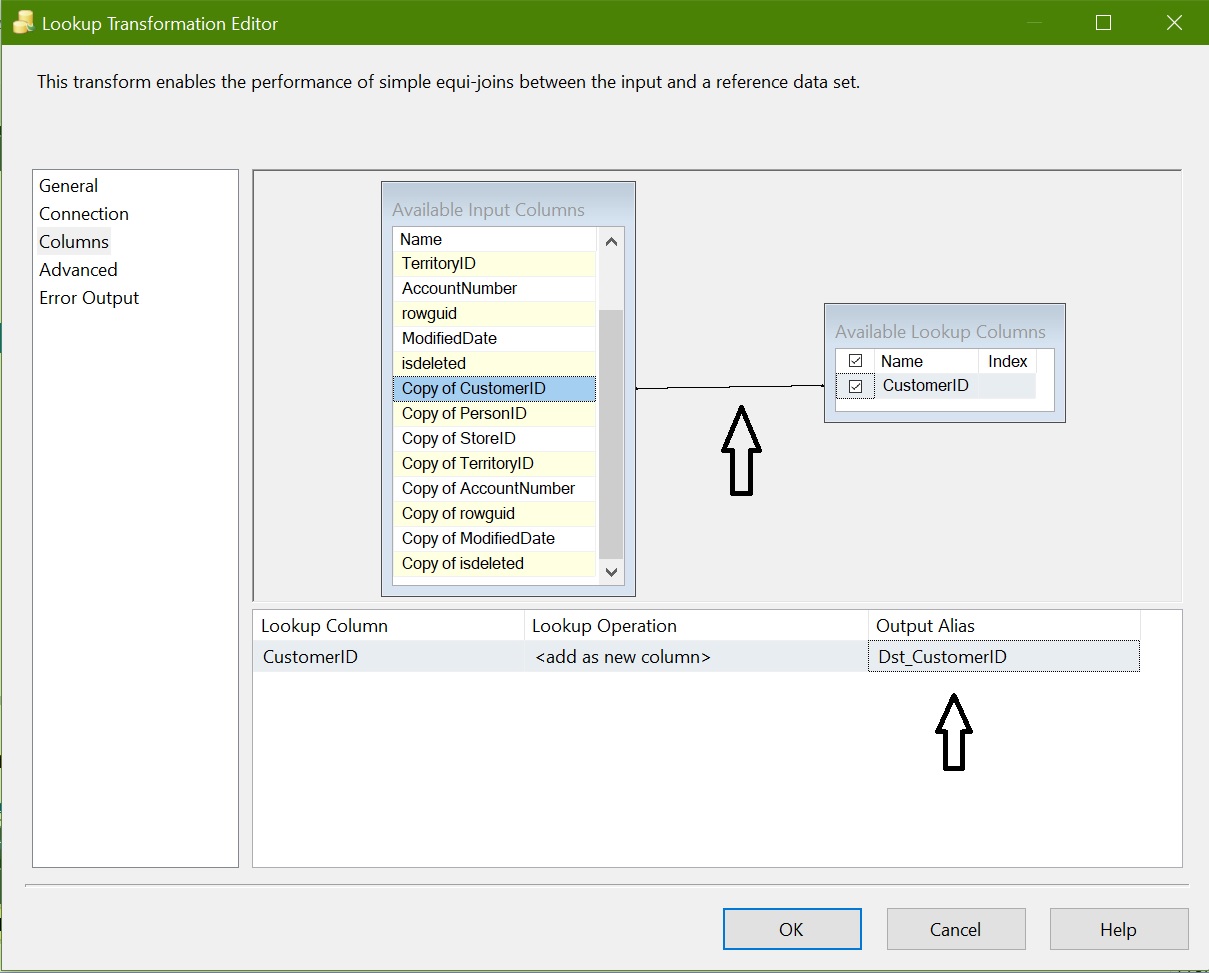
Column Mapping:

Here we are mapping source column “Copy of CustomerID” to destination column “CustomerID”.

To differentiate between source and reference make Output Alias as “Dst_CustomerID”.
Incremental Load in SSIS with example

Add a OLEDB Destination and name it as “Insert Customer”. Map No Match output from Lookup to OLEDB Destination:
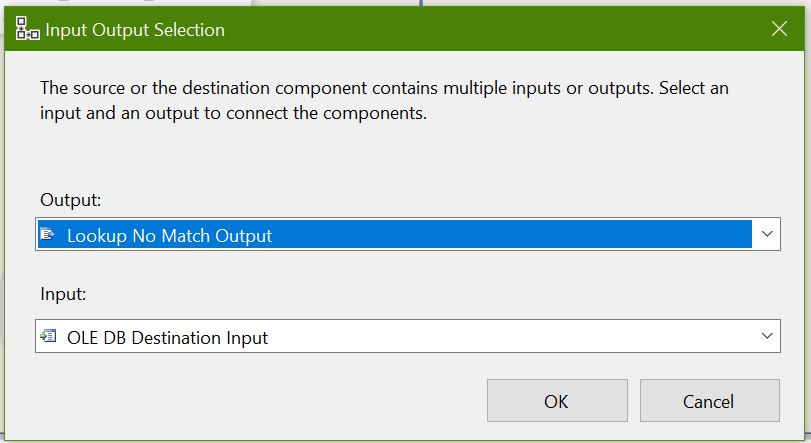
Incremental Load in SSIS with example

Edit properties for OLEDB Destination “Insert Customer”, connect destination and configure properties and map columns:
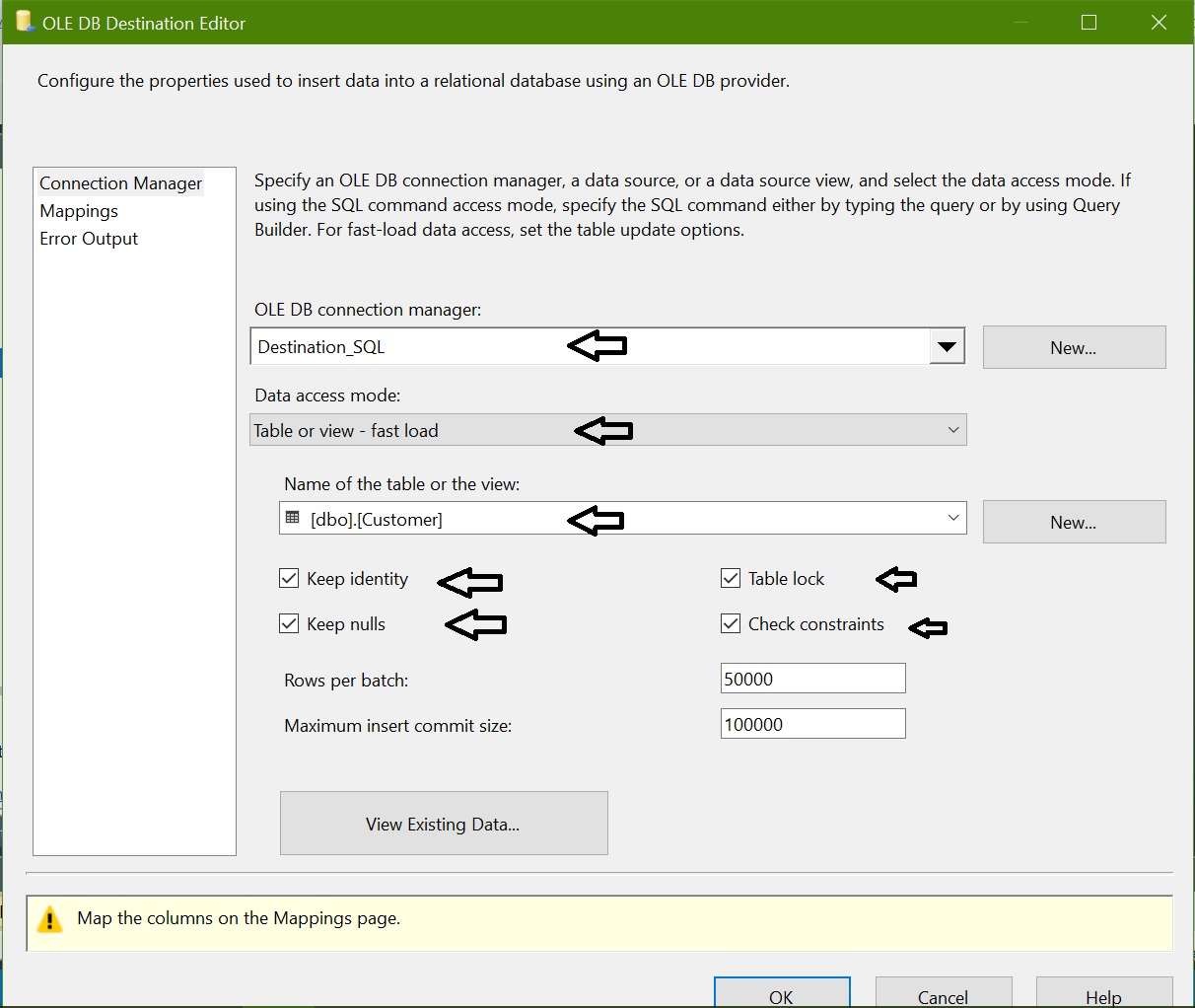
Incremental Load in SSIS with example

Map columns from converted input columns to destination columns as below:
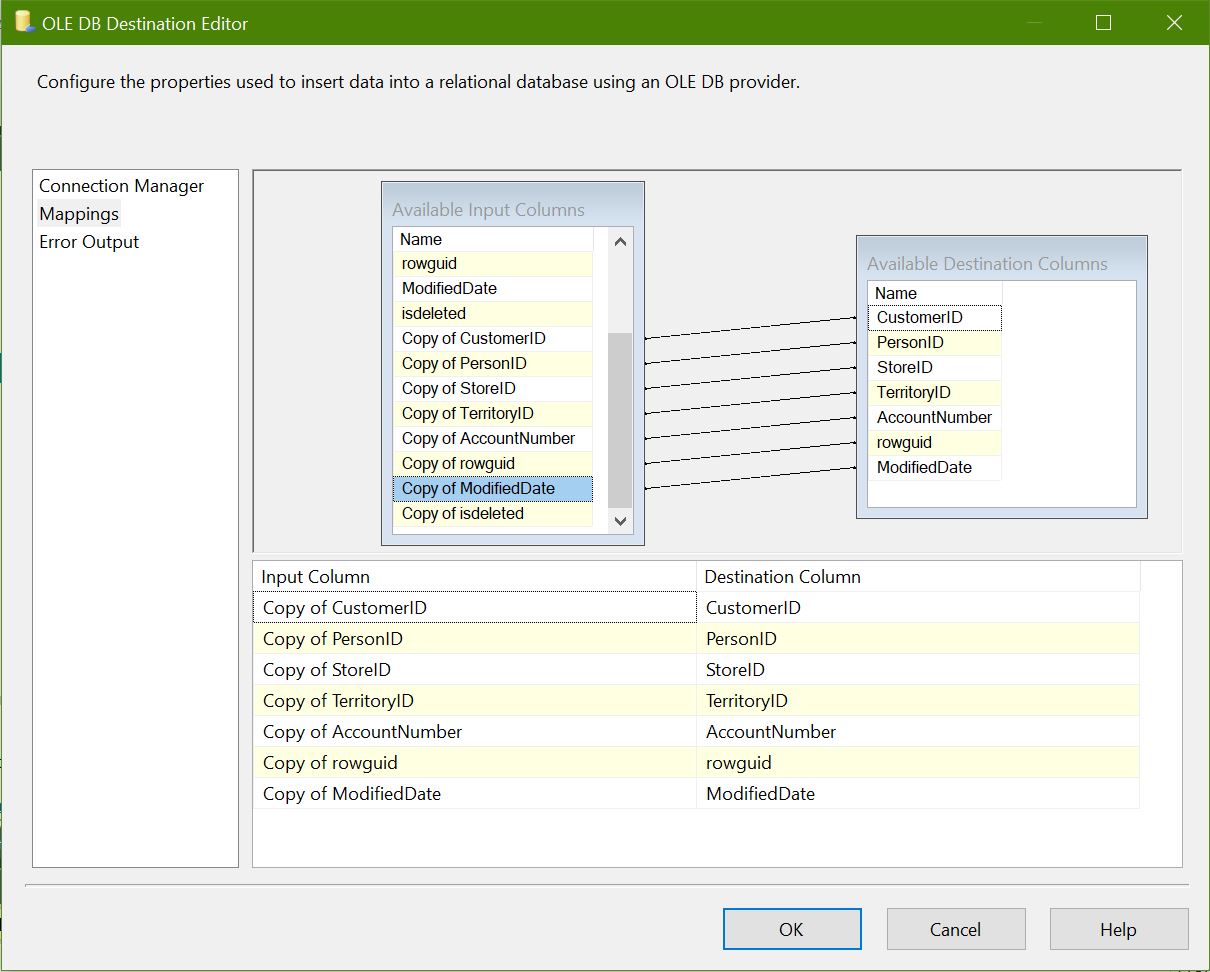
Incremental Load in SSIS with example Incremental Load in SSIS with example

ETL package is ready to handle new customer INSERT. Now we need to handle “Updated” & “Deleted” customers. Add Conditional Split transformation and connect “Lookup Match Output”:
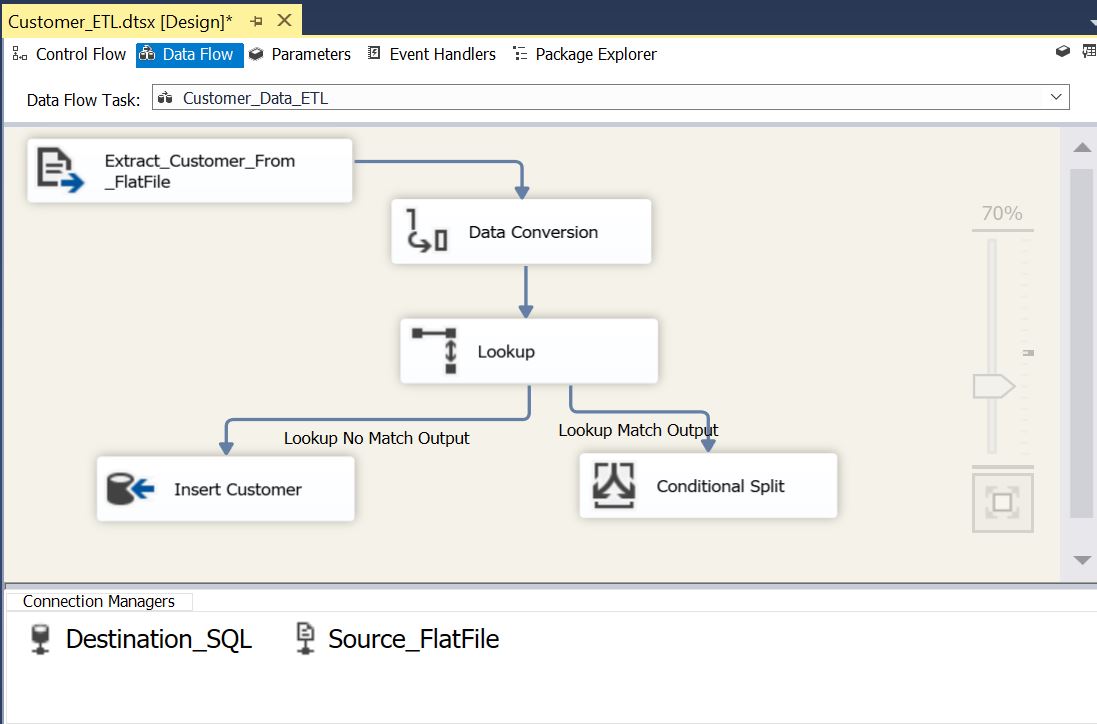
Incremental Load in SSIS with example

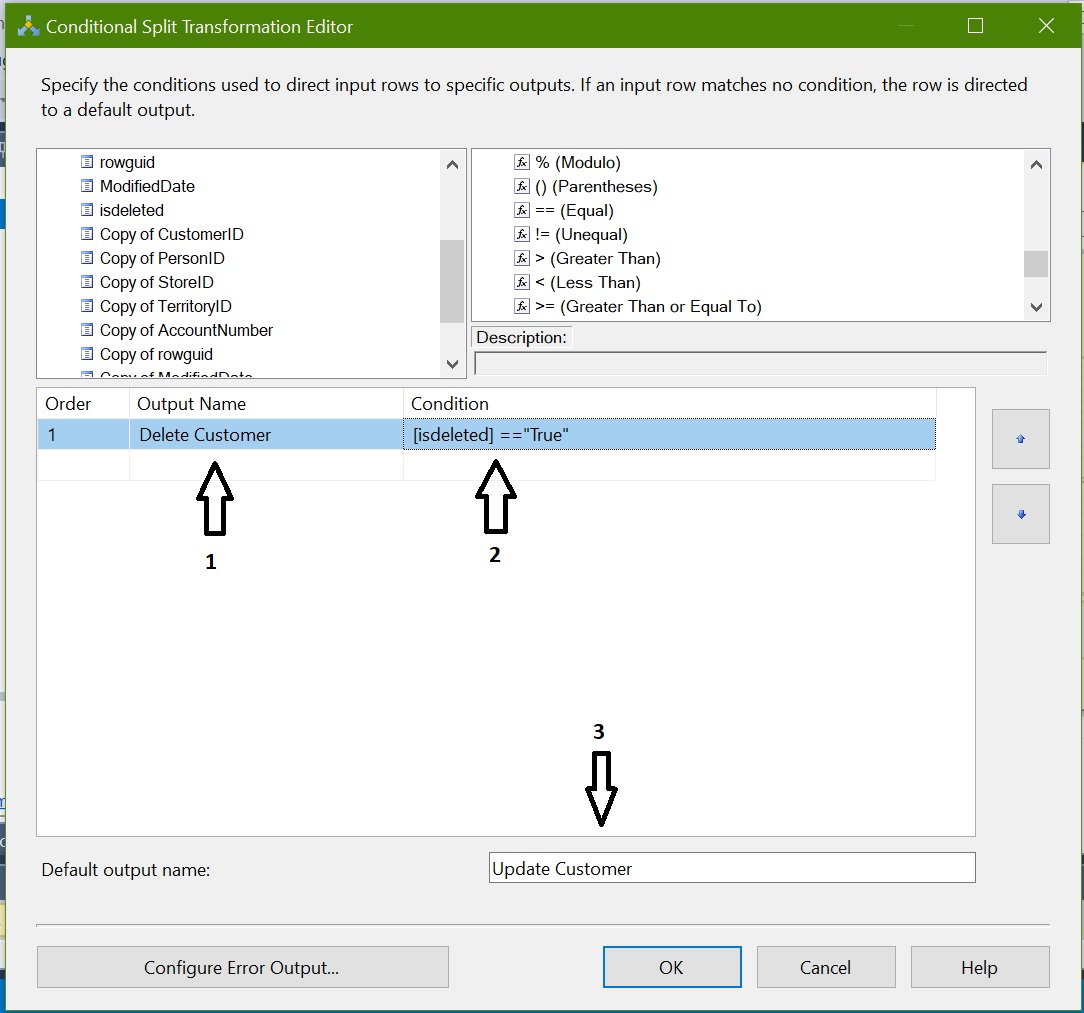
Now we need to configure Conditional Split transformation to identify the Deleted & Updated rows:

Output Name: Name it as “Delete Customer” and apply condition isdeleted == “True”

Default Output Name: “Updated Customer” as remaining all rows comes in default output where isdeleted <> “true”
Incremental Load in SSIS with example

Now we need UPDATE and DELETE customer data in destination for that we are going to use “OLE DB Command”:
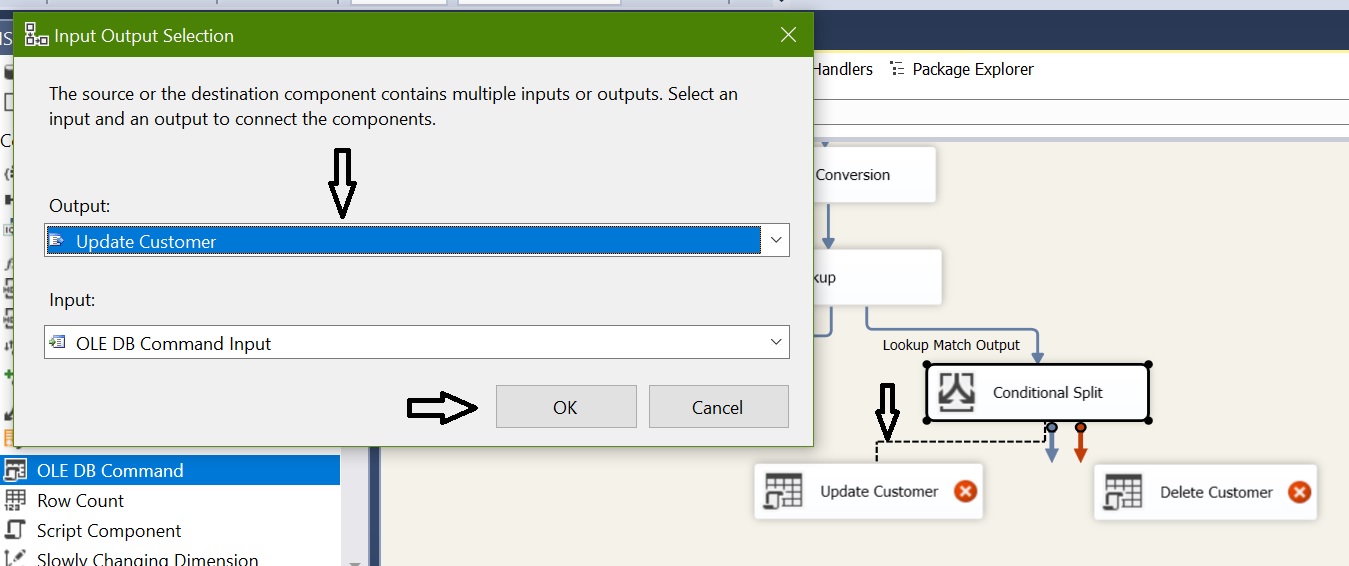
Incremental Load in SSIS with example

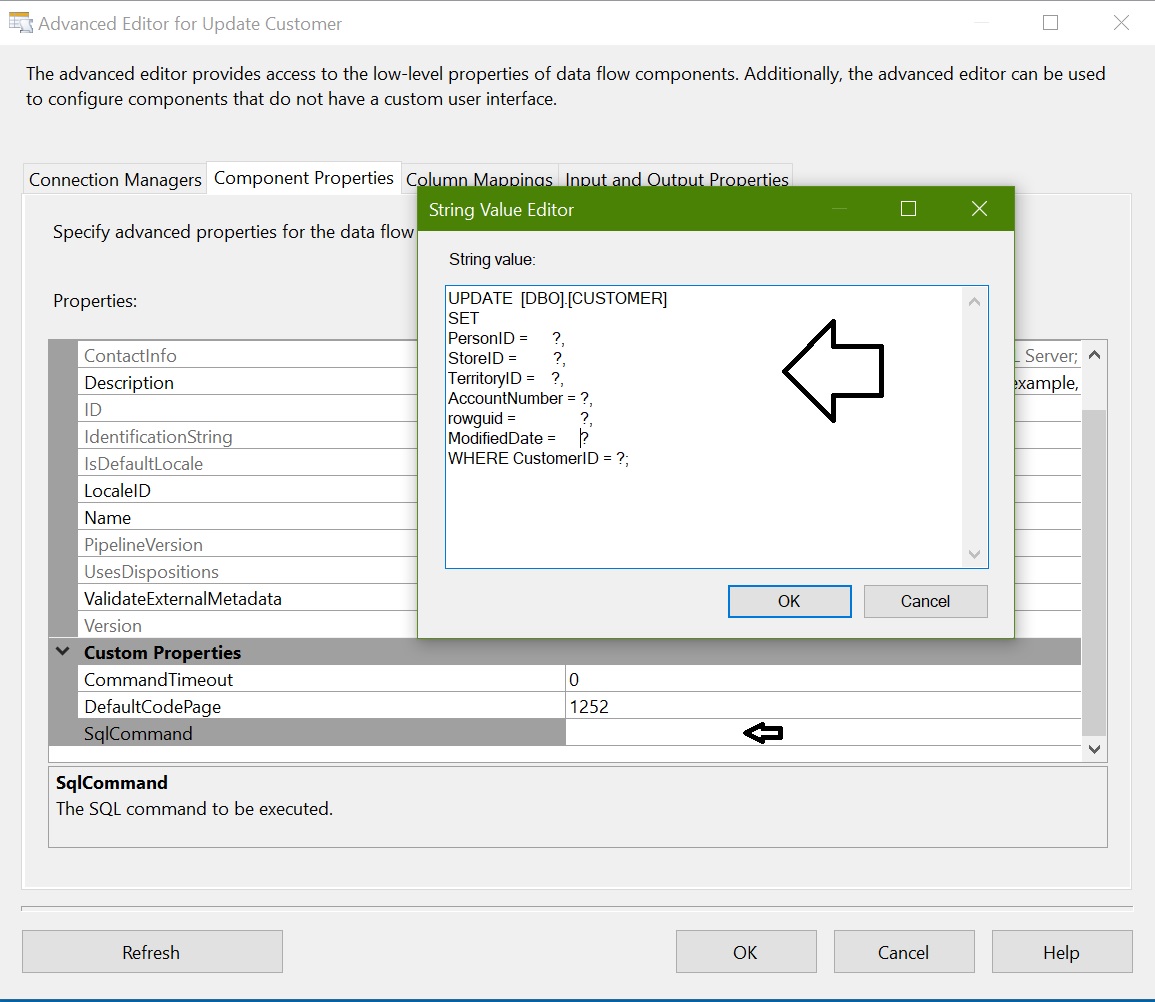
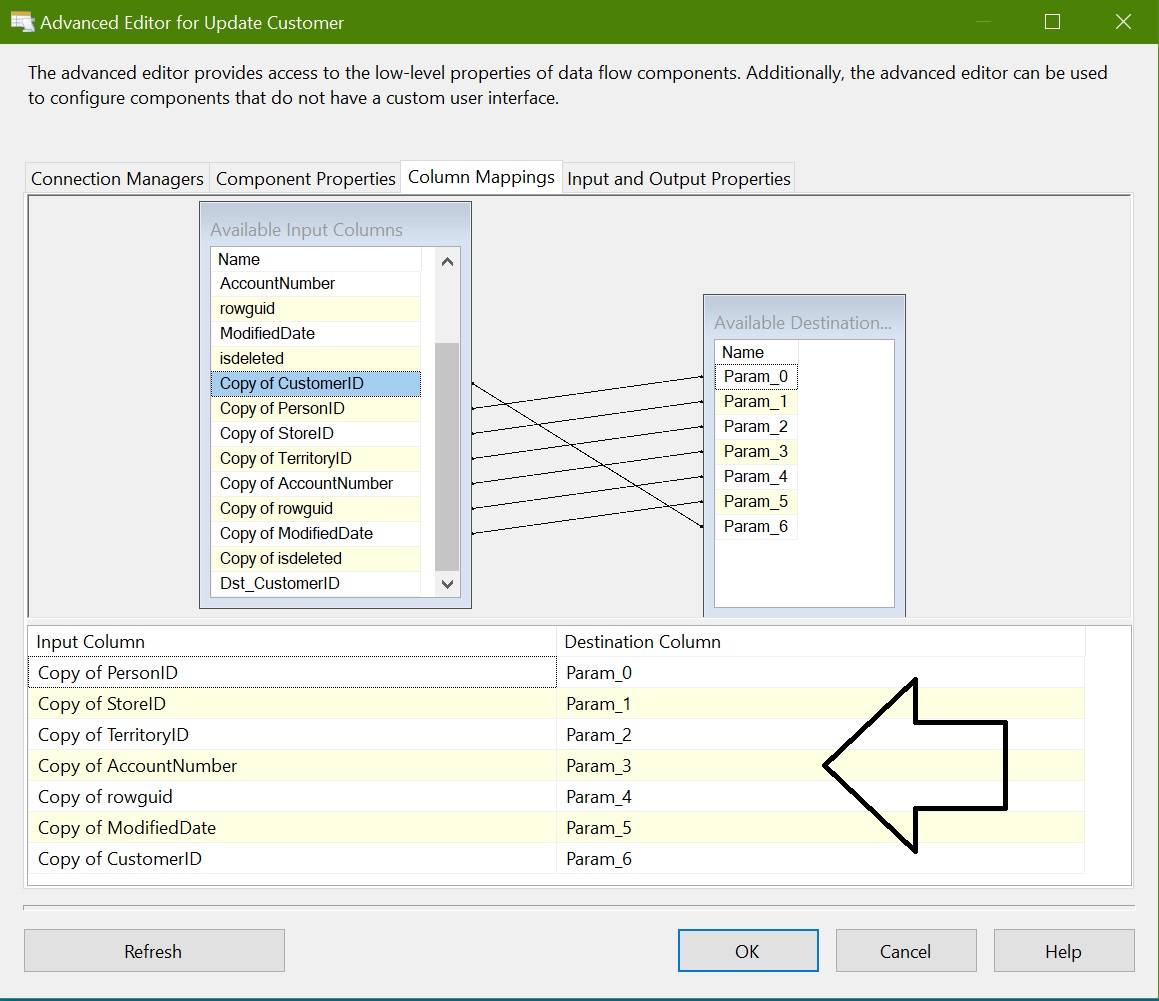
Configure OLEDB Command – Update Customer
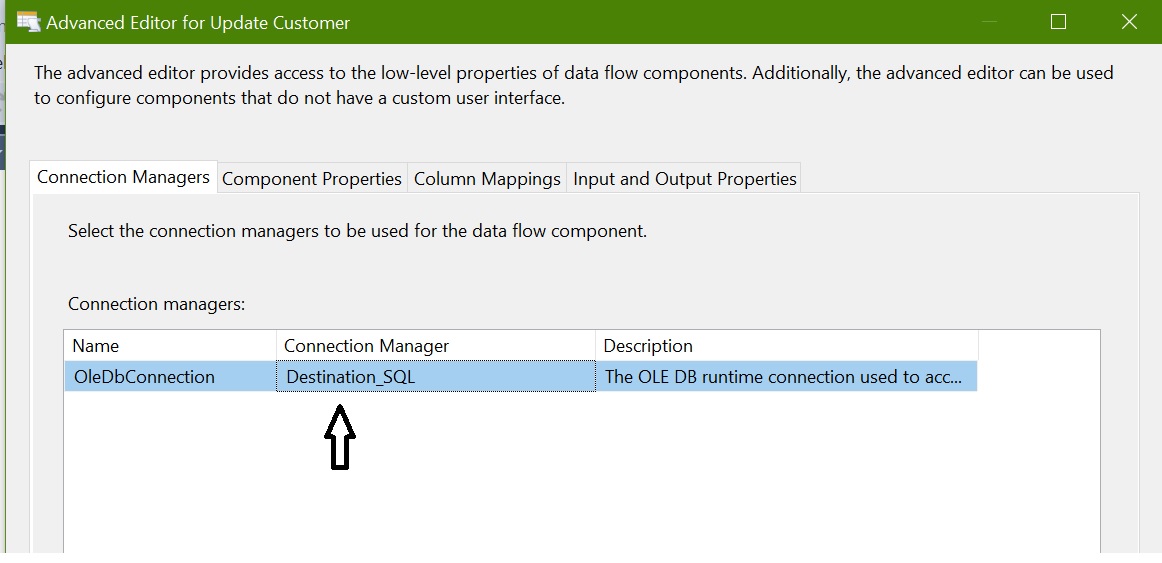
Incremental Load in SSIS with example Incremental Load in SSIS with example Incremental Load in SSIS with example

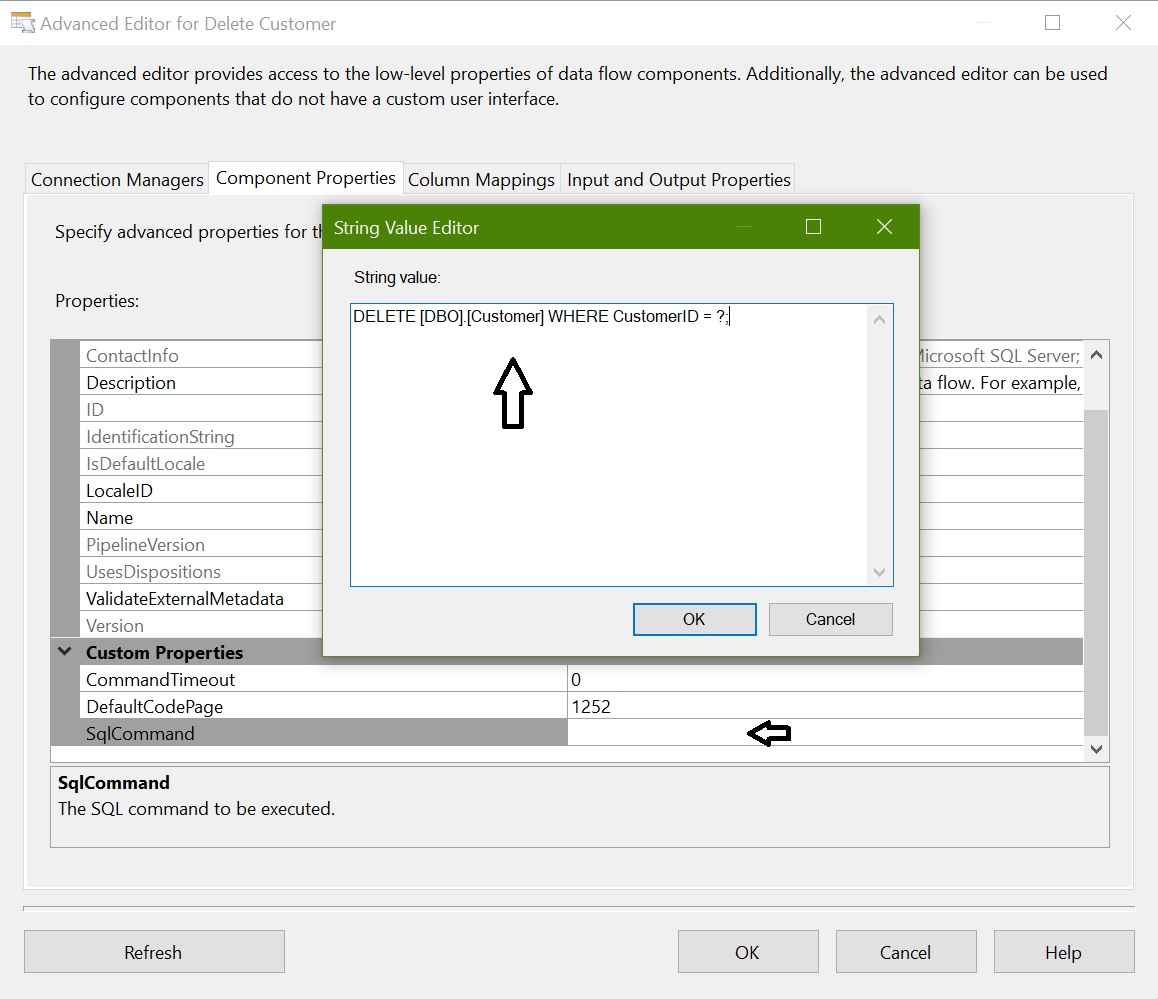
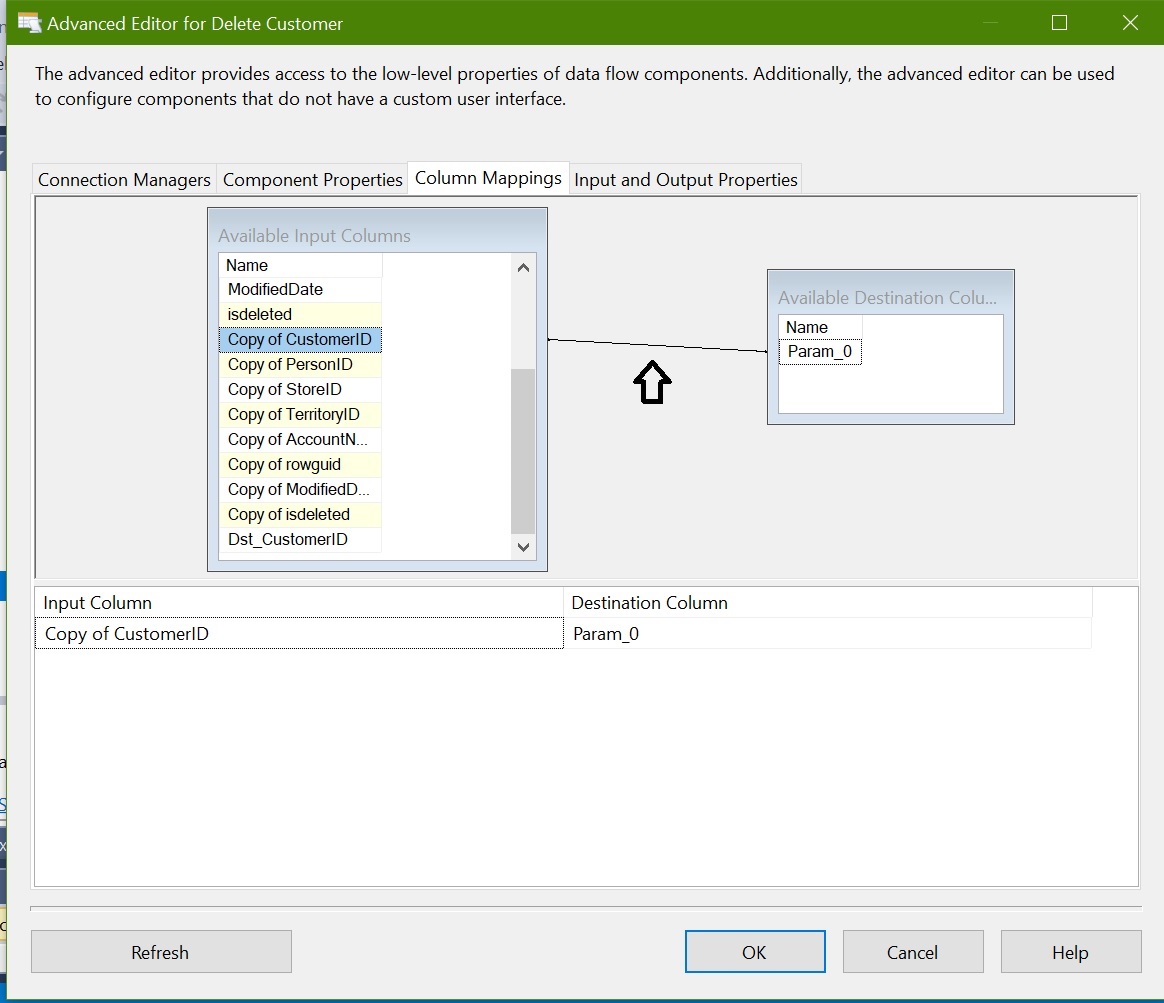
Configure OLEDB Command – Delete Customer
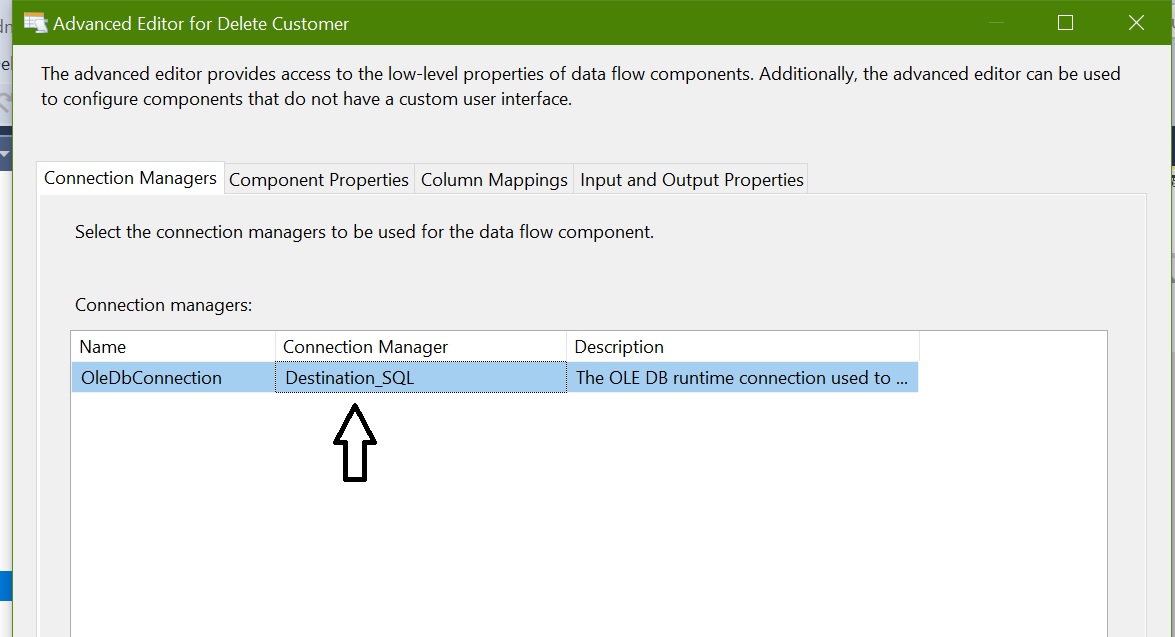
Incremental Load in SSIS with example Incremental Load in SSIS with example Incremental Load in SSIS with example

Finally the package data flow looks like below:
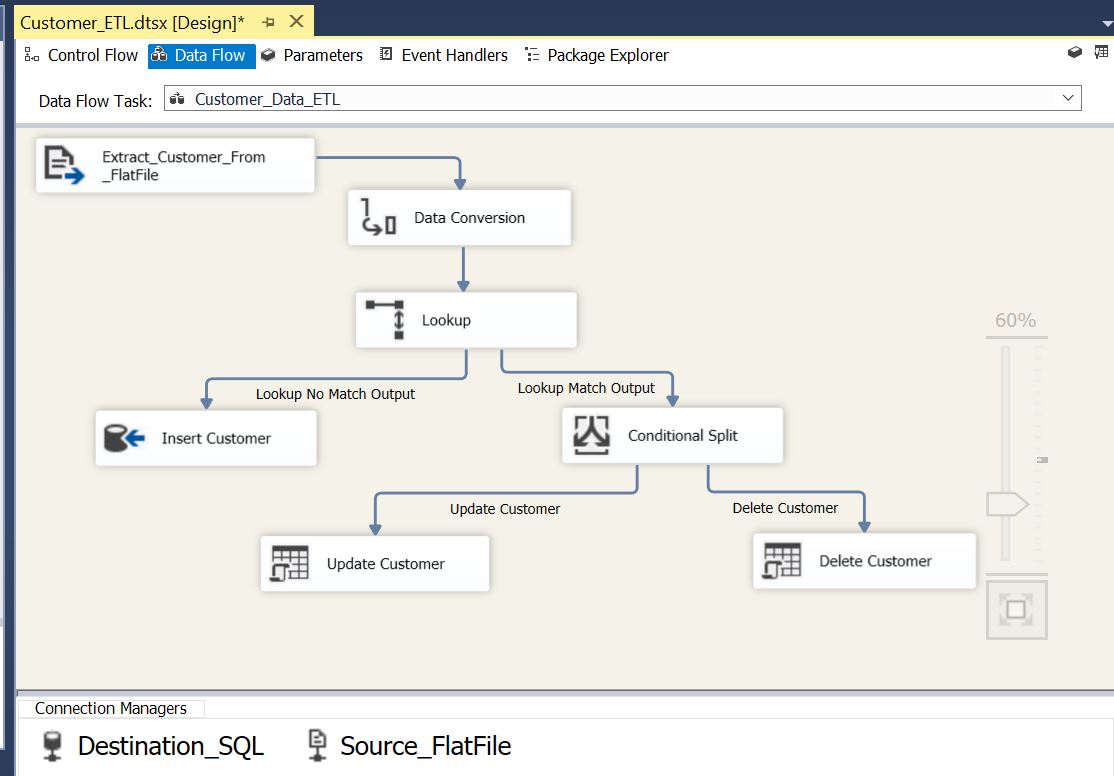
Incremental Load in SSIS with example

ETL Package Execution:

Case 1: Customer Table is empty and Flat File is having 1702 rows
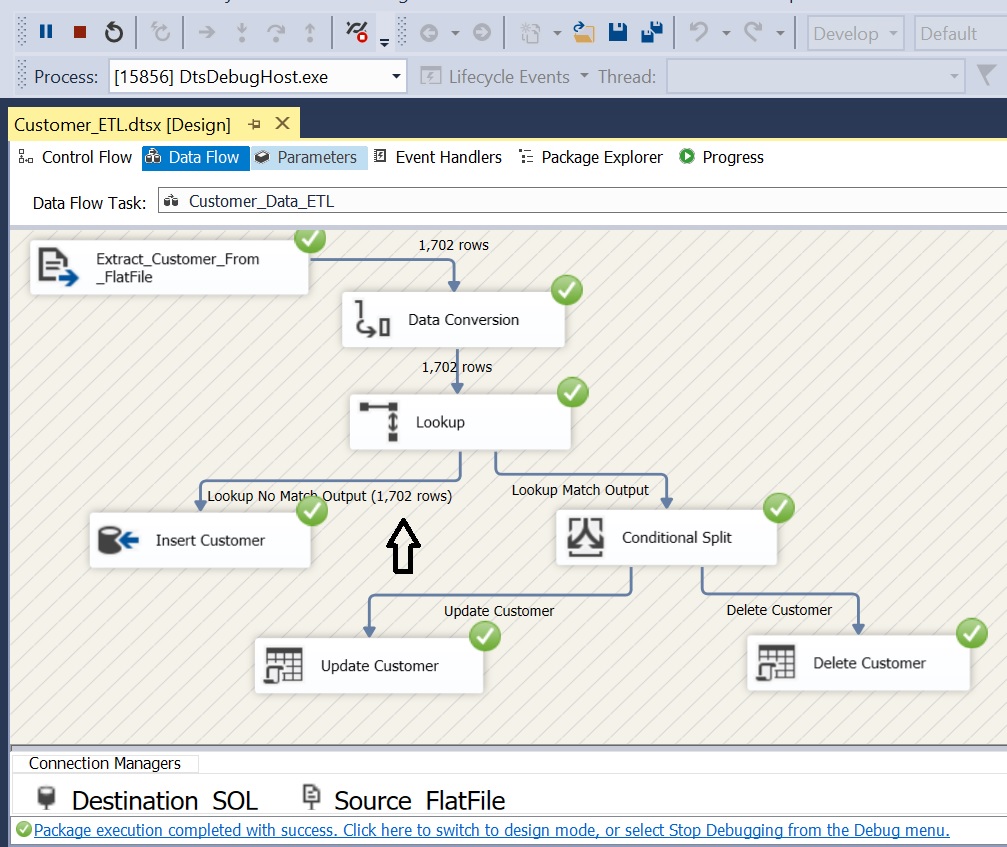
Incremental Load in SSIS with example

Case 2: Passing Delta data; 15 New Rows, 10 Updated Rows, 5 Rows with IsDeleted = 1;
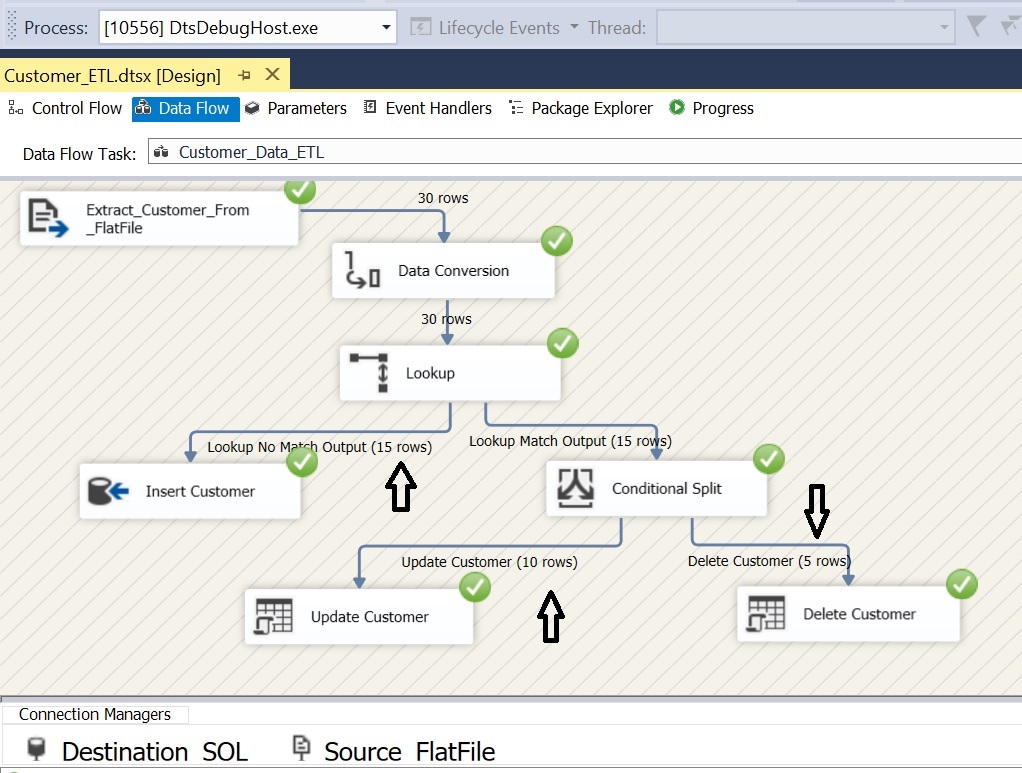
Incremental Load in SSIS with example

Summary:

  • This post explains a way to implement incremental data load using SSIS
  • We used a small dataset to demonstrate the incremental load
  • Most important point to be noted: “OLEDB Command” is a row based operation and execute the SQL Statement for each row coming input row.

Windows Cloud

Posted in MSBI, SSIS | Tagged , , , , , , , , , , , , , | 6 Comments

Script all Primary Keys, Foreign Keys in a SQL Server using T-SQL

Script all Primary Keys, Foreign Keys in a SQL Server using T-SQL

Find the relationships between tables in sql server
Get Primary Key and Foreign Key details using T-SQL
 
How to find all related tables of a given table?
You got a new database and you started working on that. Essentially when times we have to work with a new database first we need to understand the table structure and relationships. The overall structure we can understand from schema / entity diagrams.
But when it is time to start developing sql code on new database it would always be an easier way to find dependent objects of a given table using “sp_help” or with “Alt+F1”.
Here with I am giving one more way which is handy to find out these details.

When we need to Script all Primary Keys and Foreign Keys in SQL Server:

  1. When we need to understand a database system
  2. Data Imports / Delete / Truncate
  3. While moving code between environment
Now we will see the script to list out all primary and foreign keys in sql server using t-sql

Have a look at the stored procedure “[usp_get_related_Tables]” below.


To know relationship (Primary key/ Foreign Key) details for all tables

IF EXISTS (SELECT 1 FROM sys.sysobjects WHERE TYPE='P' AND NAME='usp_get_related_Tables')


BEGIN 

DROP PROCEDURE [dbo].[usp_get_related_Tables];

END

GO


CREATE PROCEDURE [dbo].[usp_get_related_Tables] (
@tbl_Schema VARCHAR(50) = NULL,
@tbl_Name VARCHAR(100) = NULL)
AS
BEGIN

SELECT TC.CONSTRAINT_SCHEMA AS 'Table_Schema',
TC.TABLE_NAME AS 'Table_Name',
TC.CONSTRAINT_NAME AS 'PrimaryKey_Name',
CCU1.COLUMN_NAME AS 'PrimaryKey_Column',
COALESCE(RC.CONSTRAINT_NAME,'N/A')   AS 'ForeignKey_Name',

COALESCE(CCU2.Column_Name, 'N/A') AS 'ForeignKey_Column',

CASE WHEN TC2.TABLE_NAME IS NULL THEN 'N/A'

ELSE TC.CONSTRAINT_SCHEMA + '.' + TC2.TABLE_NAME END AS'ForeignKey_Table'

FROM INFORMATION_SCHEMA.TABLE_CONSTRAINTS TC
INNER 
JOIN INFORMATION_SCHEMA.CONSTRAINT_COLUMN_USAGE CCU1 ON 
TC.TABLE_NAME = CCU1.TABLE_NAME 
AND 
TC.TABLE_SCHEMA = CCU1.TABLE_SCHEMA AND

 TC.CONSTRAINT_NAME = CCU1.CONSTRAINT_NAME
LEFT 
JOIN INFORMATION_SCHEMA.REFERENTIAL_CONSTRAINTS RC ON 

TC.CONSTRAINT_NAME = RC.UNIQUE_CONSTRAINT_NAME

LEFT JOIN INFORMATION_SCHEMA.TABLE_CONSTRAINTS TC2 ON

 TC2.CONSTRAINT_NAME = RC.CONSTRAINT_NAME

LEFT 
JOIN INFORMATION_SCHEMA.CONSTRAINT_COLUMN_USAGE CCU2 ON

RC.CONSTRAINT_NAME = CCU2.CONSTRAINT_NAME

WHERE TC.CONSTRAINT_TYPE = 'PRIMARY KEY' AND

TC.CONSTRAINT_SCHEMA=ISNULL(@tbl_Schema,TC.CONSTRAINT_SCHEMA) AND 

TC.TABLE_NAME = ISNULL(@tbl_Name,TC.TABLE_NAME )

ORDER BY TC.TABLE_NAME,

 TC.CONSTRAINT_NAME,

 RC.CONSTRAINT_NAME

END
EXEC [dbo].[usp_get_related_Tables]

To know relationship (Primary key/ Foreign Key) details for all tables under a given schema “Sales”
EXEC [dbo].[usp_get_related_Tables] @tbl_Schema='Sales'

To know relationship (Primary key/ Foreign Key) details for a given Table “Employee”
EXEC [dbo].[usp_get_related_Tables] @tbl_Name='Employee'

 
This Procedure was tested on SQL Server 2005, 2008 and on 2008R2.
 
 
Posted in SQL Development, SQL Scripts | Tagged , , , , , , | Leave a comment